
Step 1: Log in to Andes
To get started, log in to Andes platform using your login credentials.
Step 2: Settings → Firm Settings
Navigate to Settings and click on the Firm Settings. This will take you to the page where you can specify your firm fee preferences and enter fee details.

Step 3: Specify Firm Fee Preference
Once you’re on the Firm Settings page, click the Fees tab. You will see the option to specify your firm fee preference.
There are three options to choose from: Net of Max Fee, Net of Fee, or Gross of Fee. Select the option that best suits your firm's fee structure.
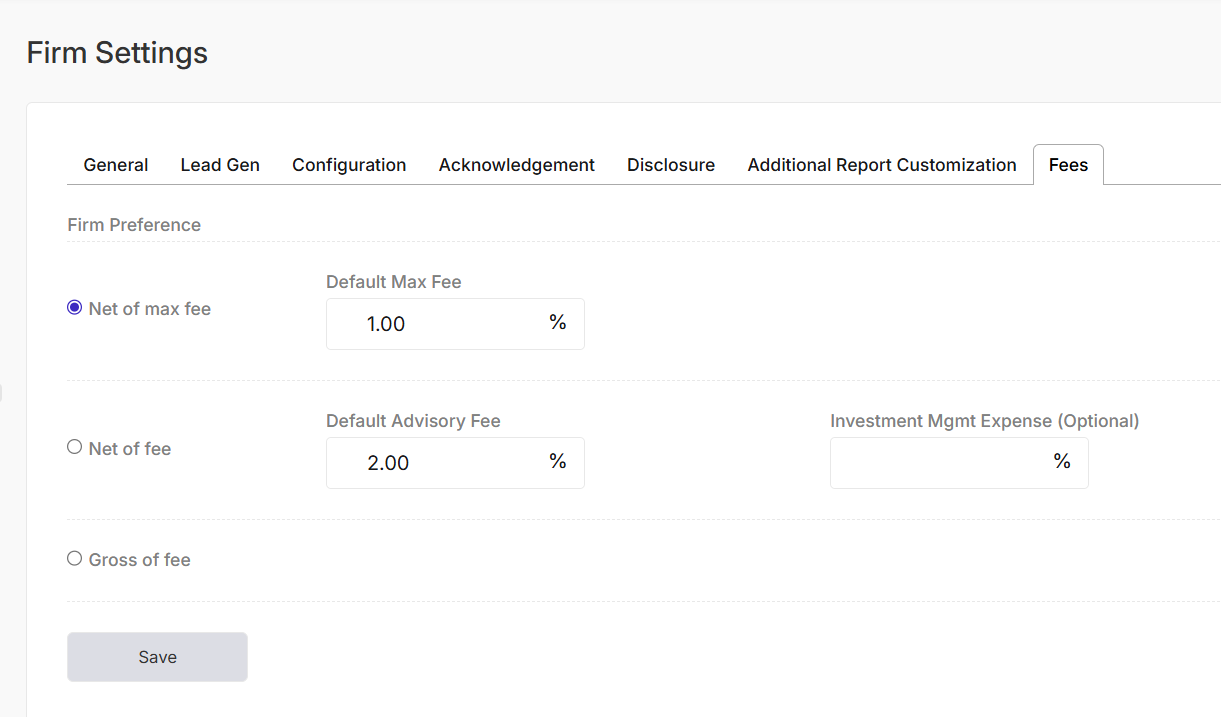
Step 4: Enter Default Max Fee, Default Advisory Fee, and Investment Mgmt Expense (Optional)
Once you have specified your firm fee preference, you will need to enter the Default Max Fee, Default Advisory Fee, and Investment Mgmt Expense (optional) details.
The Default Max Fee is the maximum fee that will be charged to a client's account.
The Default Advisory Fee is the percentage of assets under management (AUM) that the firm charges as a fee.
The Investment Management Expense is an optional field that allows you to enter the actual expense ratio of the investment vehicle in which the client's funds are invested.
Changes automatically Save.
Go back to the previous article:
Read the next article: